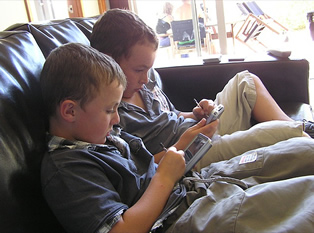
mLearning, or "mobile learning" is any sort of learning that takes advantage of the learning opportunities offered by mobile technologies. In other words, mobile learning decreases limitation of learning location through the mobility of portable devices. Mobile learning is convenient in the sense that it is accessible from virtually anywhere, which provides access to all the different learning materials available. It is also collaborative; sharing is almost instantaneous among everyone using the same content, which leads to the reception of instant feedback and tips. M-Learning also brings strong portability by replacing books and notes with portable devices filled with tailored learning content.
While there are some great advantages afforded by mobile learning, there are can be problems when mLearning is not designed well (see below). As mobile devices become more and more powerful it will become easier and easier to design effective mobile learning.
Warning: Pitfalls of Mobile Learning
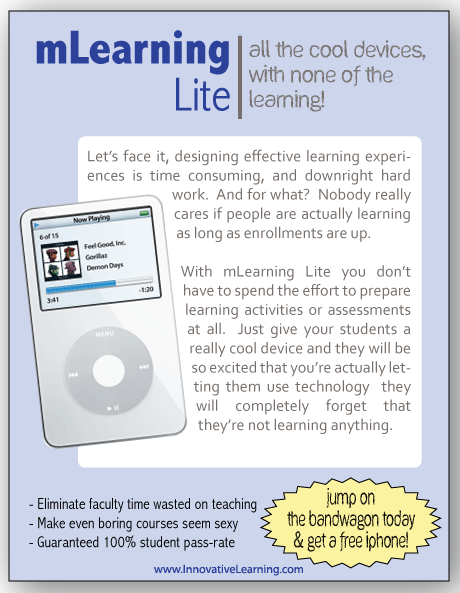
Spoof mLearning ad to illustrate Sexy Device Syndrome
click to enlarge
There are two main pitfalls of mobile learning; CBT-viewer syndrome and sexy device syndrome.
CBT Viewer Syndrome This is what happens when static content is pushed to a mobile device with limited interaction. This looks like the traditional linear computer based training (CBT) but on a smaller screen. Think of watching a PowerPoint presentation on an iPod. Typically there is no human interaction and limited computer interaction.
Sexy Device Syndrome
This is the tendency to be more interested in the coolness factor of the device than the quality of the learning experience. Often in these cases there is really no instructional design at all. Instead, learners just access existing online learning materials from a portable device. Not that there is anything wrong with using a mobile web-browser to do online learning, but it certainly doesn't take advantage of the affordances of the mobile device.
Designing Effective Mobile Learning Experiences
As portable devices become increasingly ubiquitous, the ability to deliver mobile learning experiences becomes both an opportunity and an expectation for learning organizations.
There are four types of interactions that make mLearning effective. While not all interactions need to be used for all learning experiences, a healthy mix of interactions should be included in an effective mobile learning program. If you find you are using only one type of interaction, you should carefully review your design.
Type of Interaction
Idea for mobile learning
Learner >< Learner Interactions
Use points creatively to encourage learners to interact with each other
Create a unique hashtag on Twitter for your learning experience
Learner >< Expert Interactions
Have learners follow/interact with domain experts on Twitter
Use audience polling to improve in-class experience (polleverywhere.com)
Learner >< Content Interactions
Make content engaging and relevant (Publishing a Kindle book is a good way to get started with mobile content. Branching YouTube branching videos and also good - and don't underestimate the value of SMS texts)
Learner >< Context Interactions
Encourage learners to engage with their environment (take pictures of "evidence" and post it to Twitter for other learners)
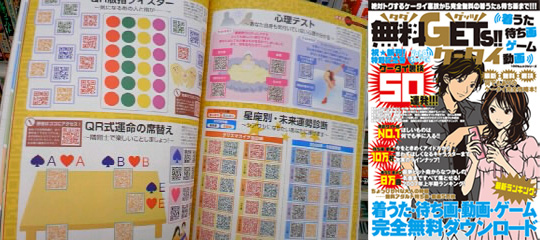
Use mobile devices to enhance reality (see QR codes below)
(based on Michael Moore's Three types of interaction. American Journal of Distance Education, 3(2), 1-6. (1989).
SMS or text messaging is by far the most wildely accessable interactive communication platform in the world. There are approximately 5.3 billion mobile phones around the world. But only about 30% of them have the capability to connect to the internet or receive data. At the same time, nearly 100% of mobile phones - even really old ones - can receive and send SMS messages. Yet despite its huge level of adoption worldwide, text messaging is not used often for teaching and learning. All you need to get started is a tool for managing sending and receiving SMS messages, and a service provider to send the messages for you.
Fortunately, there is a great little piece of free software for managing SMS messages for educational organizations called FrontlineSMS. The software runs on Mac or PC and allows you to send messages and set up automatic responses to text messages you receive in just minutes. This could be used for communication with students and parents, and even for assessment purposes.

 Instructional Technology

 SMS or text messaging is by far the most wildely accessable interactive communication platform in the world. There are approximately 5.3 billion mobile phones around the world. But only about 30% of them have the capability to connect to the internet or receive data. At the same time, nearly 100% of mobile phones - even really old ones - can receive and send SMS messages. Yet despite its huge level of adoption worldwide, text messaging is not used often for teaching and learning. All you need to get started is a tool for managing sending and receiving SMS messages, and a service provider to send the messages for you.